> For the complete documentation index, see [llms.txt](https://run-ai-docs.nvidia.com/llms.txt). Markdown versions of documentation pages are available by appending `.md` to page URLs; this page is available as [Markdown](https://run-ai-docs.nvidia.com/saas/infrastructure-setup/procedures/event-history.md).
# Event History
The NVIDIA Run:ai control plane provides the audit log API and event history table in the NVIDIA Run:ai UI. Both reflect the same information regarding changes to business objects: clusters, projects and assets etc.
{% hint style="info" %}
**Note**
Only system administrator users with tenant-wide permissions can access Audit log.
{% endhint %}
## Event History Table
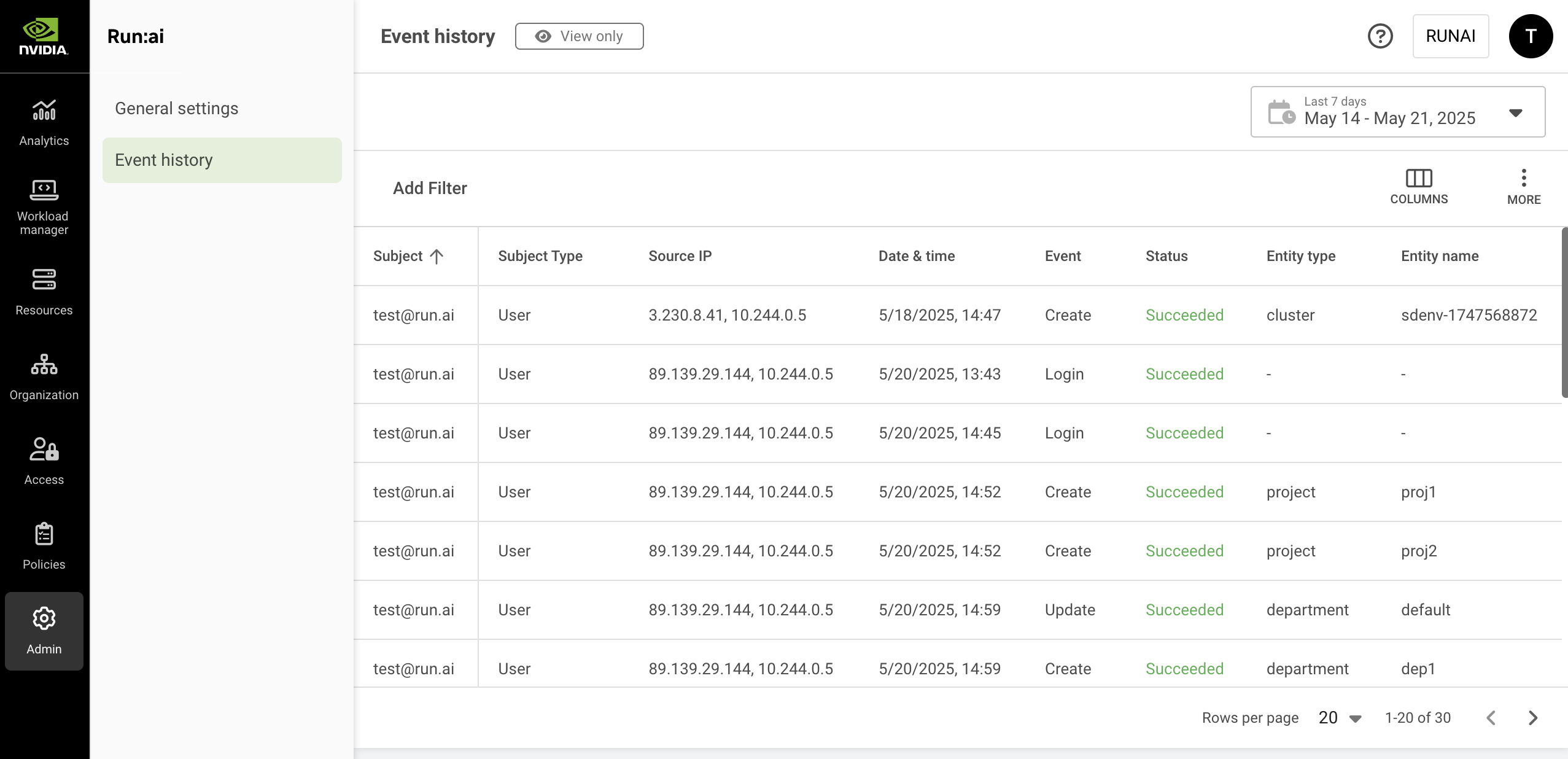
The Event history table can be found under Event history in the NVIDIA Run:ai UI.
The Event history table consists of the following columns:
| Column | Description |
| ------------ | -------------------------------------------------------------------------------------------------------------------------------------------------------------------------------------------------------- |
| Subject | The name of the subject |
| Subject type | The user or service account assigned with the role |
| Source IP | The IP address of the subject |
| Date & time | The exact timestamp at which the event occurred. Format dd/mm/yyyy for date and hh:mm am/pm for time. |
| Event | The type of the event. Possible values: Create, Update, Delete, Login, Password reset, Password set |
| Event ID | Internal event ID, can be used for support purposes |
| Status | The outcome of the logged operation. Possible values: Succeeded, Failed |
| Entity type | The type of the logged business object. |
| Entity name | The name of logged business object. |
| Entity ID | The system's internal id of the logged business object. |
| *URL* | The endpoint or address that was accessed during the logged event. |
| HTTP Method | The HTTP operation method used for the request. Possible values include standard HTTP methods such as `GET`, `POST`, `PUT`, `DELETE`, indicating what kind of action was performed on the specified URL. |
### Customizing the Table View
* Filter - Click ADD FILTER, select the column to filter by, and enter the filter values
* Search - Click SEARCH and type the value to search by
* Sort - Click each column header to sort by
* Column selection - Click COLUMNS and select the columns to display in the table
* Download table - Click MORE and then Click Download as CSV or Download as JSON
## Using the Event History Date Selector
The Event history table saves events for the last 90 days. However, the table itself presents up to the last 30 days of information due to the potentially very high number of operations that might be logged during this period.

To view older events, or to refine your search for more specific results or fewer results, use the time selector and change the period you search for.\
You can also refine your search by clicking and using ADD FILTER accordingly.
## Using API
Go to the [Audit log](https://run-ai-docs.nvidia.com/api/audit/auditlogs) API reference to view the available actions.\
Since the amount of data is not trivial, the API is based on paging. It retrieves a specified number of items for each API call. You can get more data by using subsequent calls.
## Limitations
Submissions of workloads are not audited. As a result, the system does not track or log details of workload submissions, such as timestamps or user activity.
---
# Agent Instructions
This documentation is published with GitBook. GitBook is the documentation platform designed so that both humans and AI agents can read, navigate, and reason over technical content effectively. Learn more at gitbook.com.
## Querying This Documentation
If you need additional information that is not directly available in this page, you can query the documentation by asking a question.
Perform an HTTP GET request on the following URL with the `ask` and `goal` query parameters:
```
GET https://run-ai-docs.nvidia.com/saas/infrastructure-setup/procedures/event-history.md?ask=&goal=
```
`ask` is the immediate question: it should be specific, self-contained, and written in natural language.
`goal` is what the user is ultimately trying to achieve, the reason they need the answer. Sharing it helps GitBook give you a better, more relevant answer. A goal is most helpful when it describes the outcome the user wants rather than restating the question. For example, with `ask=how do I create an API token`, a goal like `automate deployments from our CI pipeline` lets GitBook tailor the answer to that use case.
The response will contain a direct answer to the question and relevant excerpts and sources from the documentation.
Use this mechanism when the answer is not explicitly present in the current page, you need clarification or additional context, or you want to retrieve related documentation sections.