Preparations

NVIDIA Run:ai installation via NVIDIA Base Command Manager (BCM) is intended to simplify deployment, employing defaults meant to enable most NVIDIA Run:ai capabilities on NVIDIA DGX SuperPOD systems. See Installation for alternative installation approaches.

Pre-Installation Checklist

The following checklist outlines infrastructure, networking, and security requirements that must be collected and validated before beginning an NVIDIA Run:ai deployment. It’s provided for convenience to help ensure all prerequisites are met.

It’s recommended to save all necessary prerequisite files, along with any generated during the deployment, in a secure location that is accessible from the BCM head node. This will ease the installation process and help facilitate any subsequent redeployment, upgrade, or debugging needs. The /cm/shared/runai/ directory is used and will be assumed throughout this document.

Requirement
Purpose
Example

1

IP Address

Reserved IP for NVIDIA Run:ai control plane ingress

10.1.1.25

2

IP Address

Reserved IP for NVIDIA Run:ai inference

10.1.1.26

3

Name Record

Fully Qualified Domain Name (FQDN) pointing to the reserved internal IP used for the NVIDIA Run:ai control plane

runai.example.com → 10.1.1.25

4

Name Record

Wildcard FQDN pointing to the same IP used for control plane network access for NVIDIA Run:ai subdomain workspaces access

*.runai.example.com → 10.1.1.25

5

Name Record

Wildcard FQDN pointing to a separate reserved internal IP for serving NVIDIA Run:ai inference workloads

*.runai-inference.example.com → 10.1.1.26

6

TLS Certificate

Full certificate chain required for secure access to the control plane FQDN

/cm/shared/runai/full-chain.pem

7

TLS Private Key

Private key associated with the certificate.

Important note: The private key must be kept secure.

/cm/shared/runai/private.key

8

Local CA Certificate (optional)

Full trust chain (signing CA public keys) for organizations that cannot use publicly trusted certificate authority

/cm/shared/runai/ca.crt

9

NVIDIA Run:ai Registry Credential

NVIDIA token required to access the NVIDIA Run:ai container registry. Used for downloading container images and artifacts from https://runai.jfrog.io/.

/cm/shared/runai/credential.jwt

A single-line file containing the base64-encoded token and no other text. For example:

SwLyIsXCJzDqzC9tE6vik6xxZkKY9OmvjiVu5pqNLij2-rdKA0SiEfK49fR7J8Z0CaeVuEMVYAr74gtWQoUtI8LHehuO4n1RJHPEvAQJBCojelPkTQ_6-tcWQ6gMI51BX9ZgY0EDmdDTVg7PMsIbNltJT78TAwZB-mdmesyNLtHshrMLy_HySIl2faajnK5mzuXKIB6Sd9cb5Xm-HTgFSgVd9lxCSgZRpGojyQ2c5pEnX8r96TYe2ndiq6kgnvA4zF1DruGwsgU_dF61Aj3l0hOkYYrYasgl6P7LaZp8gwk_0byl4ZYfO6OWuC3UjHidCsz7sTyxHQlDUnmv-dnzJsmqgZqS7L5SczEocw0NHjtx98ox99P6l6 Note: For illustration only. The above example is not a valid token.

10

Time Synchronization

All nodes involved must be synchronized using Network Time Protocol (NTP)

11

BCM Node Labels

k8s-system-user, dgx-b200-k8s or dgx-gb200-k8s

Address Reservations and Name Records

Before installing NVIDIA Run:ai, make sure that at least the two IPs indicated in the pre-installation checklist table above are reserved, and the Fully Qualified Domain Names are properly associated and resolvable. Validating this before proceeding is recommended.

Reserve IP Addresses

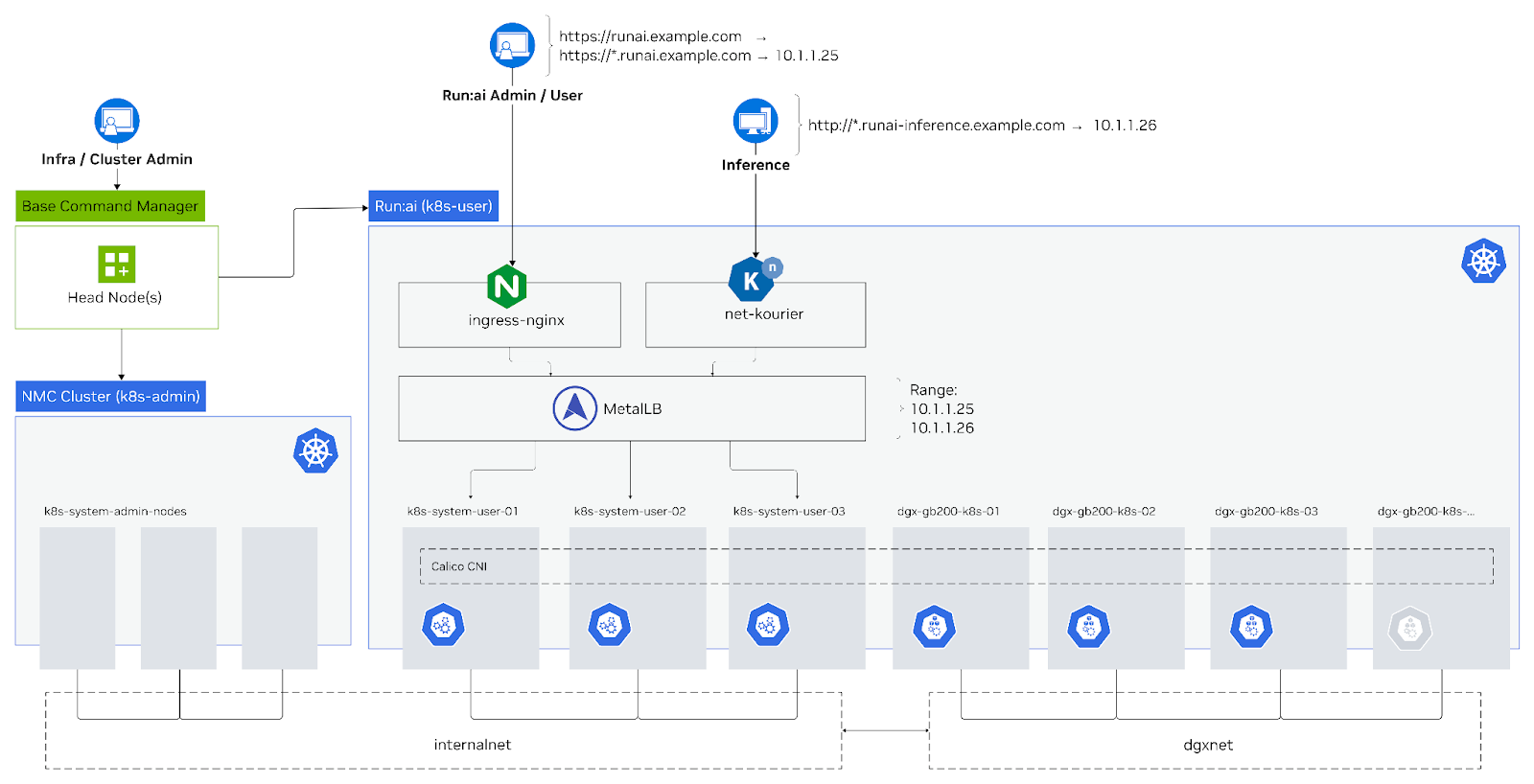
Reserve at least two IP addresses from the internalnet network address block. All reserved IPs must be reachable within your internal network and cannot conflict with other allocations. These are critical for exposing the NVIDIA Run:ai control plane and inference services:

  • NVIDIA Run:ai control plane - Reserve one IP address for accessing core components such as the UI and API.

  • NVIDIA Run:ai workspaces subdomains access using the same IP address.

  • Inference - Reserve a second IP address specifically for serving inference workloads.

Note

For NVIDIA DGX SuperPOD and BasePOD, the IP addresses must be selected from the internalnet range that the control plane nodes reside on. DGX worker nodes reside on separate dedicated networks (typically prefixed with dgxnet). Be sure to avoid assigning addresses from those ranges.

The BCM BaseView network section (Networks > Network Entities > Actions) will depict which IP range is used for internalnet and which are presently being consumed. Additionally, the following indicates what pool is reserved for dynamic (DHCP) allocation within that range. Do not select IPs from either of what is being used or are reserved.

cmsh -c "network show internalnet; quit"

Parameter                        Value                                           
-------------------------------- ------------------------------------------------
Name                             internalnet                                                                       

Base address                     x.x.x.0
Dynamic range start              x.x.x.248                                    
Dynamic range end                x.x.x.254 
Netmask bits                     24  

Address Accessibility

As suggested by the name, internalnet is reserved for communication between control plane nodes and as described in SuperPOD documentation makes use of standard blocks of nonroutable addresses (RFC1918).

To ensure the reserved IP addresses are accessible, implementation planning must consider the intended use. Several options are available depending on requirements. For example, VPN or remote shell access with private name records (local to the device accessing the endpoints) to the environment may suffice. For delivering production inference serving to an external audience, alternative routable address blocks with firewall coverage limiting inbound access to the ingress IP and relevant ports only may be necessary. For detailed guidance, see Network requirements to plan implementation accordingly.

DNS Records

A Fully Qualified Domain Name (FQDN) is required to install the NVIDIA Run:ai control plane (e.g., runai.example.com). This cannot be an IP address alone. The domain name must minimally be resolvable inside the organization's private network. The FQDN must point to the control plane’s reserved IP, either:

  • As a DNS (A record) pointing directly to the IP

  • Or, a CNAME alias to a host DNS record pointing to that same IP address

Enablement of NVIDIA Run:ai workspaces accessibility via subdomains are established by creating an additional DNS (A record) wildcard pointing to the IP for the NVIDIA Run:ai control plane.

For inference workloads, additionally configure a wildcard DNS record that maps to the reserved inference ingress IP address. This ensures each inference workload is accessible at a unique subdomain.

For example:

IP Address
FQDN
Purpose

10.1.1.25

runai.example.com

Accessing the NVIDIA Run:ai control plane (UI and API)

10.1.1.25

*.runai.example.com

NVIDIA Run:ai workspaces subdomains

10.1.1.26

*.runai-inference.example.com

Serving endpoints for Inference workloads

Note

Name resolution should be validated prior to installing. For example:

# Validate Name Resolution

dig A runai.example.com

;; ANSWER SECTION:
runai.example.com.	60	IN	A	10.1.1.25

Certificates for Secure Communication

These certificates (commonly called TLS/SSL certificates, in the standard X.509 format) establish trust by proving a server’s identity and enabling encrypted communication between clients and services. They are required to secure communication between the NVIDIA Run:ai control plane, workload elements, and services, and are used to authenticate system components while encrypting data in transit.

There are four main categories of certificates that may be leveraged in the installation, refer to the TLS certificates section for more details.

NVIDIA Run:ai Certificate Requirements

You must have TLS X.509 certificates that are issued for the Fully Qualified Domain Names (FQDN) of the NVIDIA Run:ai control plane and Inference ingress. The certificate’s Common Name (CN) must match the FQDN and the Subject Alternative Name (SAN) must also include the FQDN. The following should be provided:

  • The full certificate chain (e.g., /cm/shared/runai/full-chain.pem)

  • The private key associated with the certificate (e.g., /cm/shared/runai/private.key). The private key must be kept secure. It proves the server’s identity and is required to decrypt TLS traffic. If compromised, an attacker could impersonate the service or read encrypted communications.

# Run the following from the /cm/shared/runai/ directory

# Certificate Verification 
openssl verify -CAfile ./rootCA.pem -verify_hostname runai.example.com ./runai.crt

# Inspecting Certificate
openssl x509 -in ./runai.crt -text -noout | grep -A 5 "Subject Alternative Name"

NVIDIA Run:ai Registry Credentials

To access the NVIDIA Run:ai container registry to obtain installation artifacts, you will receive a token from NVIDIA. Take the token and paste it into your /cm/shared/runai/credential.jwt file to be used during the BCM installation assistant.

# for illusration only, not a valid Base64 token

less /cm/shared/runai/credential.jwt

wLyIsXCJzDqzC9tE6vik6xxZkKY9OmvjiVu5pqNLij2-rdKA0SiEfK49fR7J8Z0CaeVuEMVYAr74gtWQoUtI8L
HehuO4n1RJHPEvAQJBCojelPkTQ_6-tcWQ6gMI51BX9ZgY0EDmdDTVg7PMsIbNltJT78TAwZB-mdmesyNLtHsh
rMLy_HySIl2faajnK5mzuXKIB6Sd9cb5Xm-HTgFSgVd9lxCSgZRpGojyQ2c5pEnX8r96TYe2ndiq6kgnvA4zF1
DruGwsgU_dF61Aj3l0hOkYYrYasgl6P7LaZp8gwk_0byl4ZYfO6OWuC3UjHidCsz7sTyxHQlDUnmv-dnzJsmqg
ZqS7L5SczEocw0NHjtx98ox99P6l6

The installation assistant will request this token and it can be provided by either pasting it into the field or specifying a file path. Placing this token, the certificates mentioned above, configuration files, and any other deployment artifacts in the /cm/shared/runai/ directory is suggested. This directory resides on a shared mountpoint accessible from all nodes.

SuperPOD Installation Architecture

Hardware Requirements

This guide describes deploying NVIDIA Run:ai via BCM installation assistant on DGX SuperPOD systems. All necessary hardware elements are provided for in the bill of materials for DGX GB200 and B200 systems and later. Refer to the System requirements for other platforms.

NVIDIA Base Command Manager (BCM)

BCM offers centralized tools for provisioning, monitoring, and managing DGX SuperPODs, BasePODs, and other GPU-accelerated clusters. This includes scaling and managing DGX node lifecycle, configuration of network topologies, storage configurations, and more. In the context of this guide, it’s the nexus for management of underpinning hardware, OS images, underlay network topology, storage configuration, and streamlining deployment of NVIDIA Run:ai on NVIDIA DGX SuperPOD.

BCM Head Node

The Head Node is the primary management host for Base Command Manager and may be installed on two separate hosts (primary and alternate) with a shared virtual IP address for high availability. The BCM cm-kubernetes-setup installation assistant will configure a proxy at the head nodes that assists in providing and securing common access to the Kubernetes clusters it provisions.

BCM Node Categories

In BCM, a node category is a way to group nodes that share the same configuration (e.g based on hardware profile and intended purpose). Defining node categories and an associated software image with each allows the system to assign the appropriate software image and configurations to each group.

Before installing NVIDIA Run:ai, prepare the following BCM node categories:

Category Type
Category Name

k8s-system-user

Required

dgx-b200-k8s, dgx-gb200-k8s

Required

Dedicated NVIDIA Run:ai system nodes

runai-system

Optional

Dedicated NVIDIA Run:ai CPU worker nodes

runai-cpu-worker

Optional

Dedicated etcd nodes

k8s-etcd-user

Optional

Note

These categories are established in BCM and will be employed in the installation assistant for NVIDIA Run:ai. In the case of the optional categories, NVIDIA Run:ai administrators can optionally establish node roles mapping to these as needed, but the installation assistant does not automate mapping or synchronization of BCM node categories to NVIDIA Run:ai node roles.

The BCM 11 Administrator Manual provides background for creating and managing node categories, software images, provisioning nodes and more. For DGX SuperPOD, refer to the "Category Creation" and "Software Image Setup" sections of the Installation guide for specific instructions on how to prepare node categories.

# DGX GB200 SuperPOD Example
# Nodes can either be ARM or x86 based - it's recommended to
# include the architecture in the Software Image name 

cmsh -c "category list; exit"

Name (key)                  Software image                   Nodes   
--------------------------- -------------------------------- --------    
dgx-gb200-k8s               dgx-image-gb200-k8s              12              
k8s-system-user             k8s-system-user-image            3
k8s-system-admin            k8s-system-admin-image           3

Installation Assistant

The BCM cm-kubernetes-setup installation assistant automates deployment through a Terminal User Interface (TUI) wizard. The wizard inquires about environment-specific details, deploys and configures the required subcomponents, and completes with a functioning self-hosted NVIDIA Run:ai capability. The deployment uses opinionated defaults for DGX SuperPOD systems intended to deliver ease of use making available the broadest set of features.

Kubernetes

NVIDIA Run:ai is built on Kubernetes, complementary cloud-native components (e.g. Prometheus, Knative), and NVIDIA Kubernetes enabling software (e.g. GPU Operator, Network Operator). These will be installed and configured by the cm-kubernetes-setup installation assistant.

On DGX GB200 SuperPOD and later systems, a separate Kubernetes cluster will also be present and should precede the installation of NVIDIA Run:ai. This cluster delivers the capability of NVIDIA Mission Control (NMC) and is not intended for deployment of other workloads or non-administrative access. It’s important to be aware of this cluster in relation to the dedicated NVIDIA Run:ai that will be created as described in this guide.

NVIDIA Run:ai Kubernetes Cluster

The system components section indicates that NVIDIA Run:ai is primarily made up of two components installed over Kubernetes (namely the NVIDIA Run:ai cluster and the NVIDIA Run:ai control plane). The installation assistant described in this guide combines both within a single Kubernetes cluster. Additionally, the steps described here make use of the same CPU nodes to combine and co-mingle the Kubernetes control plane with etcd and the NVIDIA Run:ai control plane.

Load Balancing

The BCM NVIDIA Run:ai deployment assistant makes use of a load balancer (MetalLB) within the Kubernetes cluster to provide overall service resiliency and consistent access to NVIDIA Run:ai endpoints.

Distinguishing Between Clusters

The naming conventions that are used to distinguish between the two:

k8s-admin

NVIDIA Mission Control

k8s-user

NVIDIA Run:ai

The following commands (executed from the BCM head node) are recommended for switching between clusters via the command line:

# list available Kubernetes modules
module avail
-------------- /cm/local/modulefiles -----------------------

kubernetes/k8s-admin/1.32.9-1.1
kubernetes/k8s-user/1.32.9-1.1

# display which modules are presently loaded
module list


# set access to a cluster 
module load kubernetes/k8s-user/1.32.9-1.1

# switch between Kubernetes clusters
module swap kubernetes/k8s-admin kubernetes/k8s-user

Shared Storage

Workload Assets

NVIDIA Run:ai workloads must be able to access data from any worker node in a uniform way to access training data and code as well as save checkpoints, weights, and other machine learning-related artifacts. After completing NVIDIA Run:ai deployment via BCM as described in this guide, data sources should be established within NVIDIA Run:ai on shared storage.

When installing atop NVIDIA DGX SuperPOD and BasePOD systems, please consult reference architecture documentation for certified storage options and documentation from your storage vendor for CSI provider and StorageClass configuration to supply high performance data sources.

System Installation

This guide refers to the use of shared storage to support Kubernetes, NVIDIA Run:ai and certain associated required services as part of the BCM deployment assistant. Preceding installation instructions aren’t covered in this guide, but it’s recommended to consult NFS server vendor guidance to ensure proper configuration of exports and mount parameters for performance, resilience, and data integrity aligned to service level requirements.

TLS Certificates

Certificate Categories

The four main categories of certificates that may apply here:

  • Public (globally trusted) certificates - These are issued by well-known Certificate Authorities (CAs) and are recognized automatically by most operating systems, browsers, and clients because the issuing CA’s root certificate is already included in default trust stores. Public certificates are used for services that must be trusted without additional client configuration:

    # List default pre-installed root CA certificates
    
    dpkg -L ca-certificates | grep '\.crt$'
  • Internal (organization-issued) certificates - Issued by a corporate or internal CA (e.g. a managed PKI, or an internal CA cluster). These are “real” X.509 certificates, but the issuing CA is not part of the global trust chain. They are trusted only within the organization once the internal root CA certificate is distributed to hosts and clusters.

  • Local CA–issued certificates - These are “real” certificates generated by first creating a private Certificate Authority (CA) root, then using it to sign individual server or client certificates. Clients only need the CA’s root certificate installed once, after which all certificates issued by that CA are trusted automatically. These are typically used for quick (short-lived) testing or isolated scenarios but are not recommended for production scenarios since they are not globally trusted or distributed automatically for potential client access. Additionally, they create a management and process burden on the creator for common maintenance (e.g. rotation, revocation tasks).

  • Local (self-signed) certificates (not supported) - Self-signed certificates are unique because each one is created and signed by itself, acting as its own trust anchor. Unlike certificates issued by a shared CA, there’s no common root of trust. Every certificate must be explicitly installed and trusted on every client that needs to connect to a given service. In a distributed environment with many services (such as with NVIDIA Run:ai on SuperPOD), this means that you would need to distribute and manage dozens of separate certificates across all nodes and clients. Self-signed certificates are explicitly unsupported and should not be used with NVIDIA Run:ai.

Certificate File Formats

Regardless of how a certificate is issued, the encoding is the same: X.509 Base64-encoded in PEM format. File extensions such as .pem, .crt, and .cer are technically interchangeable in this context so long as the contents are properly encoded, but conventionally .crt is used for certificates, .key for private keys, and .pem for generic containers or chains.

Ensure you are working with PEM-encoded certificates by examining them to make sure they resemble the following:

# Example (not valid for use, from openssl project test certs)

less /cm/shared/runai/ca.crt

-----BEGIN CERTIFICATE-----
MIIDATCCAemgAwIBAgIBATANBgkqhkiG9w0BAQsFADASMRAwDgYDVQQDDAdSb290
IENBMCAXDTIwMTIxMjIwMDk0OVoYDzIxMjAxMjEzMjAwOTQ5WjASMRAwDgYDVQQD
DAdSb290IENBMIIBIjANBgkqhkiG9w0BAQEFAAOCAQ8AMIIBCgKCAQEA4eYA9Qa8
oEY4eQ8/HnEZE20C3yubdmv8rLAh7daRCEI7pWM17FJboKJKxdYAlAOXWj25ZyjS
feMhXKTtxjyNjoTRnVTDPdl0opZ2Z3H5xhpQd7P9eO5b4OOMiSPCmiLsPtQ3ngfN
wCtVERc6NEIcaQ06GLDtFZRexv2eh8Yc55QaksBfBcFzQ+UD3gmRySTO2I6Lfi7g
MUjRhipqVSZ66As2Tpex4KTJ2lxpSwOACFaDox+yKrjBTP7FsU3UwAGq7b7OJb3u
aa32B81uK6GJVPVo65gJ7clgZsszYkoDsGjWDqtfwTVVfv1G7rrr3Laio+2Ff3ff
tWgiQ35mJCOvxQIDAQABo2AwXjAPBgNVHRMBAf8EBTADAQH/MAsGA1UdDwQEAwIB
BjAdBgNVHQ4EFgQUjvUlrx6ba4Q9fICayVOcTXL3o1IwHwYDVR0jBBgwFoAUjvUl
rx6ba4Q9fICayVOcTXL3o1IwDQYJKoZIhvcNAQELBQADggEBAL2sqYB5P22c068E
UNoMAfDgGxnuZ48ddWSWK/OWiS5U5VI7R/c8vjOCHU1OI/eQfhOenXxnHNF2QBuu
bjdg5ImPsvgQNFs6ZUgenQh+E4JDkTpn7bKCgtK7qlAPUXZRZI6uAaH5zKu3yFPU
2kow3LFCwYutrSfVg6JYeX+cuYsLHFzNzOhqh88Mu9yJ7pPJ8faeHFglHa51eoaw
vurAVknk7tzUxLZN0PxD9nrduVwtiluFbCPz0EtP5Dt1KylGdPrKvCJNkFkRJX+S
0t9VNIhyqLmslP5uSFtuTt8toXkizaYlxIVHckkvpuKZB8m7l8C/lom9sqagjZ1J
If+teEc=
-----END CERTIFICATE-----

If you receive a file in another format (e.g., binary .cer), consult openssl instructions to convert it to PEM before using.

Certificate Chain Components

Certificates typically exist as part of a chain of trust:

  • Leaf (server/client) certificate - The certificate presented by a service (e.g., runai.example.com). It proves the service’s identity but cannot usually be validated on its own.

  • Intermediate certificate(s) - Issued by a root or higher-level CA. These form the link between the root and the leaf. Many public CAs issue one or more intermediates for operational security.

  • Root CA certificate - The ultimate trust anchor. Public roots are distributed in operating system/browser trust stores; internal or local roots must be installed manually in those stores.

  • Full chain (fullchain.pem) - A bundle containing the leaf certificate followed by its intermediate certificate(s). This file is often required by web servers (NGINX, Apache, Kubernetes ingress) so clients receive the complete trust path from the service back to a trusted root.

Subject Alternative Names (SANs)

Subject Alternative Names (SANs) extend a certificate beyond a single Common Name (CN) by allowing multiple hostnames, domains, or IP addresses to be listed as valid identities. Modern TLS clients validate the SAN field rather than the CN, making it essential for compatibility and trust. When issuing certificates from a local CA, SANs should always be included so that services can be securely accessed under all expected names (e.g., runai.example.com, runai, and 10.1.1.25).

Last updated